We use partial classes extensively when building our Unity tools. If you've explored the source code of Advanced Scene Manager, you've probably noticed that many of its larger types are split across multiple files.
In this article, we'll explain what partial classes are, why we use them, and how they've become an important part of the way we build Unity tools.
What Are Partial Classes?
Partial classes is a C# feature that allows a single class to be split across multiple files.
Lets take a GameManager class for example.
Imagine you have
public class GameManager : MonoBehaviour
{
    public GameMode gameMode { get; set; }

    void Start() {}

    public event Action OnEvent;

    static void DoSomething() {}
}
As the class grows, different parts of the functionality can become harder to navigate.
With partial classes, you can split the same class into multiple files:
GameManager.cs
GameManager.Statics.cs
GameManager.Initialization.cs
GameManager.Events.cs
public partial class GameManager : MonoBehaviour
{
    public GameMode gameMode { get;set; }
}
public partial class GameManager : MonoBehaviour
{
    void Start()
    {
        Debug.Log($"Current Gamemode: {gameMode}");
    }
}
public partial class GameManager
{
    static void DoSomething() {}
}
public partial class GameManager
{
    public event Action OnEvent;
}
Although these members live in different files, the compiler combines them into a single GameManager class. Partial classes don't create inheritance or additional objects. They are purely an organizational feature.
For a more detailed explanation of partial classes, including how the compiler combines the different parts and additional features such as partial members, see Microsoft's documentation on Partial Classes and Members.
How Do We Use Partial Classes In Advanced Scene Manager?
The previous example was intentionally small. The benefits become much more apparent when building larger Unity tools.
Here's how some of the larger classes in Advanced Scene Manager are organized.
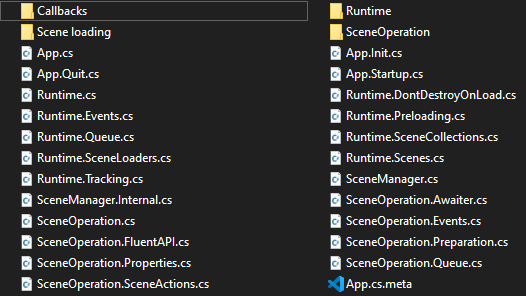
As you can see, our core classes are split into several partial files. Runtime is divided into nine files, while SceneOperation is divided into eight. Each partial groups related functionality together, making it much easier to find the code you're looking for.
Runtime contains much of the core runtime logic, including scene tracking, loading queues, events, and other systems responsible for managing scenes during play.
SceneOperation represents a single scene loading operation. Rather than placing every step of the loading process into one massive source file, each stage is implemented in its own partial.
Here's the core execution loop:
IEnumerator Run()
{

    wasCancelled = false;

    yield return PrepareForExecution();

    if (wasCancelled)
        yield break;

    yield return ShowLoadingScreen();

    yield return CloseScenes();
    yield return OpenScenes();
    yield return PreloadScenes();

    yield return PerformFinalSteps();
    yield return HideLoadingScreen();

    yield return FinalizeExecution();

}
The Run() method reads almost like a checklist, while the implementation of each step lives in another partial file dedicated to that area of responsibility. This keeps the main execution flow easy to follow without sacrificing organization.
If every loading stage, helper method, callback, and field lived in a single file, SceneOperation would quickly become much harder to navigate. Splitting the class into partials allows us to organize related code without introducing unnecessary classes or abstractions.
How ASM Evolved From Large Scripts
Advanced Scene Manager did not start with the architecture it has today. Like many Unity projects, early versions were built around simpler scripts that grew as new features were added.
As ASM developed, some of those scripts became difficult to maintain. We experimented with different ways of organizing the code, including using regions to group related functionality inside files.
Regions helped separate sections visually, but they had limitations. The code was still contained within the same file, and navigating large systems could become difficult as more features were added.
Over time, we started rewriting and restructuring parts of ASM. During that process, partial classes became one of the patterns we adopted to better organize larger systems.
Instead of grouping everything inside one file, responsibilities could be separated into dedicated files while still remaining part of the same class.
This approach allowed us to keep related functionality together while making each file easier to understand and navigate.
Why We Use Partial Classes Throughout Advanced Scene Manager
Today, partial classes are used throughout ASM. Most system classes are split into partial files, while smaller models and simple utility classes usually remain in a single file.
We use this approach because Unity tools often grow over time. A class that starts simple can eventually contain editor functionality, runtime logic, events, serialization, and utility methods.
By splitting classes from the beginning, we avoid large files becoming difficult to navigate later.
The Drawback Of Partial Classes
Partial classes are not without drawbacks.
One thing you notice when working with partial classes in Visual Studio is that navigation behaves slightly differently. When using F12 to go to a method or property implementation, Visual Studio may first show a list of all partial files containing that class instead of taking you directly to the implementation.
This means you need to know how the class is organized and which partial file contains the code you are looking for.
For us, this tradeoff is worth it. The benefit of having related functionality grouped into separate files outweighs the small inconvenience when navigating. However, it is something to keep in mind when deciding how to structure your own classes.
Final Thoughts
Partial classes are a small feature, but they have become an important part of how we structure larger Unity tools.
They allow us to keep related functionality together while separating different responsibilities into files that are easier to navigate. For us, this has become a practical way to manage the growth of systems like Advanced Scene Manager.
If you want to see this approach applied in a production Unity tool, check out Advanced Scene Manager.